
This article explains how to choose the correct workflow for your clients within the MTD IT module in Capium. There are four available workflows, and selecting the right one depends on where your client's records are kept.
Before you start:
Choosing a workflow also determines the client setup required: whether the client can be added as an Individual on their own, or whether a Sole Trader business record needs to be created and linked to an Individual first. Getting this decision right at the outset avoids having to re-link clients or move records later.
This guide covers the four workflows, the Golden Rule for choosing between them, how the legacy Self Assessment client types map onto MTD IT, workflow eligibility for clients already set up in Capium, and how to work through the decision when registering a brand new client.
The Four MTD IT Workflows
| Workflow 1 (Bridging) | Workflow 1 clients whose records are not managed in Capium at all, for example a client who keeps their own spreadsheet or uses third party software. Figures are completed outside the system, and re-uploaded for submission. This workflow uses the Individual client type directly; no Sole Trader business record is created or linked. It supports self-employment, UK property, and overseas property income, making it suitable for sole traders and landlords alike, provided none of them require VAT, CIS, accrual basis accounting, or payroll. |
| Workflow 2 (Capium 365) | Capium 365 is the most automated of the four. Records are kept and categorised directly in the Capium 365, these also allows accountants and clients to do the record keeping for multiple sources of income for the individual. and transactions publish through to the MTD IT module without manual re-entry. Like Workflow 1, it uses the Individual client type directly, with no Sole Trader record involved. It suits sole traders who are not VAT registered and do not require accrual accounting or payroll, as well as UK and overseas landlords who do not need foreign currency conversion. |
| Workflow 3 (Capium 365 with Bookkeeping) | Workflow 3 suits sole traders who need VAT or CIS returns, accrual basis accounting, sole trader accounts production, or payroll. Transactions are reconciled within Capium 365 in the same way as a for the sole trader as an entity, then published into the Bookkeeping module, from where they are imported into MTD IT for quarterly submission. This workflow requires a Sole Trader business record to exist and be linked to an Individual, since the individual is always the filing entity. It is not available for landlord income. |
| Workflow 4 (Bookeeping) | Workflow 4 is the most common workflow for existing Capium customers who were using the Bookkeeping module for sole trader clients before MTD IT was introduced. Records continue to be maintained in Bookkeeping exactly as before, with no change to day-to-day bookkeeping. When a quarterly submission is due, the accountant imports the relevant transactions directly from Bookkeeping into the MTD IT module. As with Workflow 3, this requires a Sole Trader business record linked to an Individual, and is not available for landlord income. |
Important Note: Workflows 3 and 4 are only available for self-employment income. Landlords, whether UK or overseas, cannot use Workflow 3 or 4 under any circumstance, regardless of whether they need VAT, CIS, or any other service. Landlord income must always go through Workflow 1 or Workflow 2. |
Using the Decision Flowchart
The decision flowchart is designed to help you identify which workflow is best suited for each client. Each income type has its own set of questions that you must work through in order to arrive at the correct workflow.
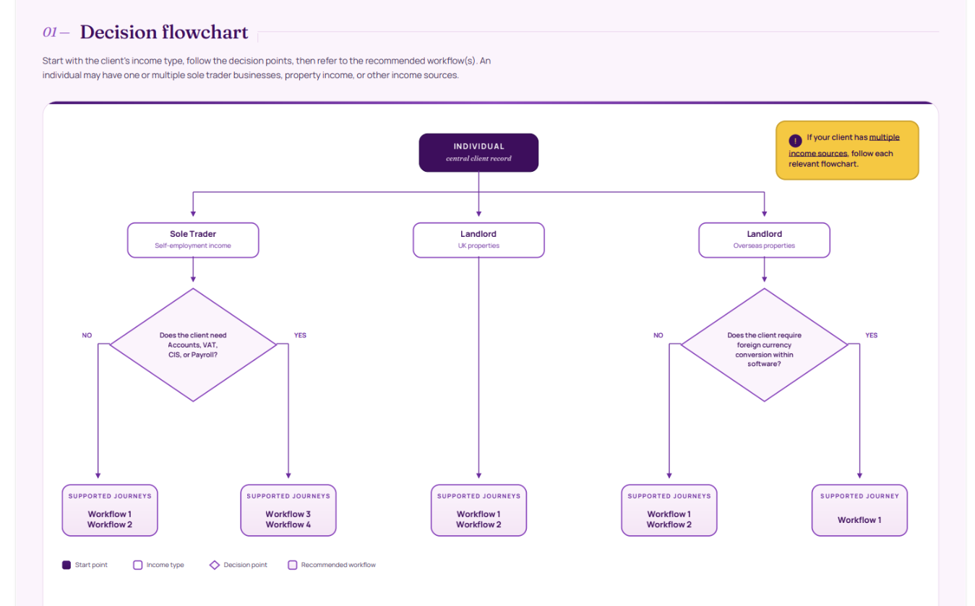
To choose between these workflows there is a simple golden rule.
The Golden Rule The right workflow always depends on where records are kept, not just the compliance needs. If a client already has an established way of keeping records, use the table and move on. The two sections below handle the difficult cases or new client registrations. |
Here, you're also choosing where records will live. VAT, CIS and payroll needs don't change the Golden Rule, but they're useful prompts:
For Sole Trader clients, work through the following questions:
- Does your client require annual accounts?
- Does your client require VAT or CIS returns?
- Does your client run payroll?
If the answer to any of the above questions is yes, you must use Workflow 3 (Capium 365 with Bookkeeping) or Workflow 4 (Bookkeeping Only).
If the answer to all of the above questions is no, you may proceed with Workflow 1 (Bridging) or Workflow 2 (Capium 365)
Clients with Multiple Income Streams
If your client has multiple income streams, you do not need to use the same workflow for every stream. You can support different workflows for different income types simultaneously. For example, you may use the Bookkeeping workflow for a client's sole trader income and the Capium 365 workflow for their landlord income.
The recommendation is to choose the workflow that is most consistent across your client base. This makes record keeping more straightforward for your practice and makes it easier for your clients to track their earnings and expenses.
| Important: If your client has more than one source of income, for example a sole trader who also has landlord income, you must follow the decision flowchart for each income type separately before making your final decision. |
Under MTD IT, the Individual is always the entity that submits to HMRC. This changes how the two client types are used:
- A simple Sole Trader case can remain set up as an Individual client. No linking is required, and the accountant can choose Workflow 1 or 2 for them.
- A Sole Trader needing fuller business infrastructure is set up as a Sole Trader business record, linked to an Individual for submissions. This gives access to all four workflows.
Next Steps
Once you have selected the appropriate workflow for your client, dedicated articles and video guides are available for each workflow, covering the full end-to-end journey including setup and features. Please scroll to the bottom of this article to access the relevant workflow guides.
Related Articles
MTD IT - Adding New Clients : Capium Support - Click here for help
MTD IT: Bridging Workflow (MTD IT Workflow 1) : Capium Support - Click here for help
MTD IT: 365 Workflow (Workflow 2) : Capium Support - Click here for help
MTD IT - Capium 365 and Bookkeeping (Workflow 3) : Capium Support - Click here for help
MTD IT - Bookkeeping Workflow (Workflow 4) : Capium Support - Click here for help
MTD IT - How to allow software to connect with HMRC : Capium Support - Click here for help
MTD IT – How to make Quarterly Submissions : Capium Support - Click here for help