
This article explains how to set a client up as a Community Interest Company (CIC) in Capium, by creating a new client directly as a CIC client.
Note: This article covers client setup only. For existing clients, who are already set up on the system please refer to this article. |
|---|
Before you start
- The client must already exist in Capium as a Limited company type, or be created as one. A CIC cannot be set up as any other client type.
- Have the client's company details to hand, including registration number, UTR and year-end date, so you can complete the record in full at this stage.
Creating a new client as a CIC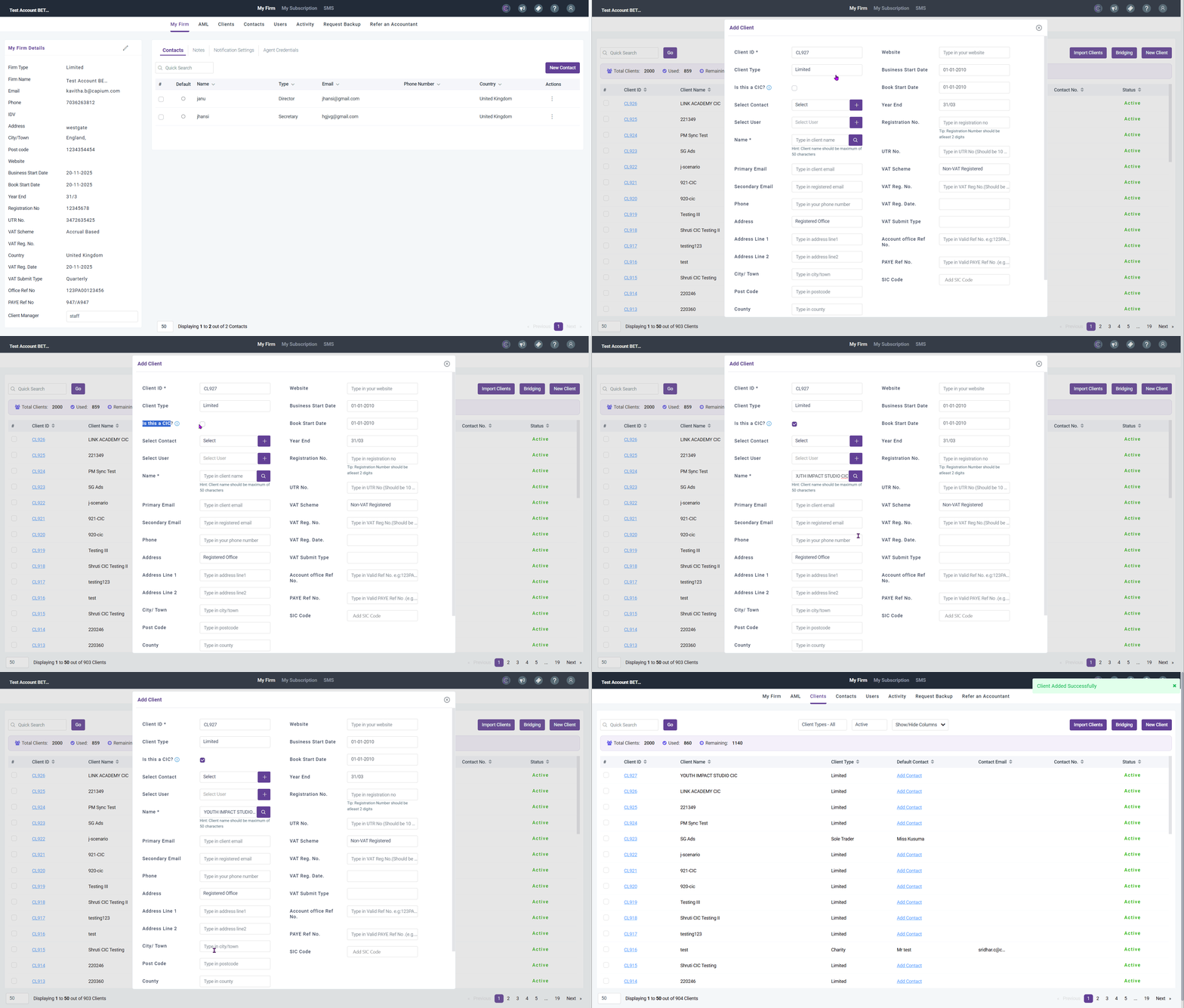
- Navigate to the client section. Navigation > My Admin > Clients > Add Client.
- Set the client type to Limited company.
- Select the option to designate the client as a CIC.
- Enter the client's details. Please make sure you fill all the relevant areas in the client setup page.
- Save the client record.
Add to Related Articles:
- Converting an existing client to a CIC (already present)
- CIC Accounts Walkthrough
- CIC Filings in Accounts Production
- Completing the CIC 34 Notes in Accounts Production
- How to generate and file the CIC accounts and CIC 34 report
- How to add Trial Balance (covers the "trial balance import" the note box mentions)
- Report Settings in Accounts (covers "report settings")