
When submitting quarterly updates to HMRC under Making Tax Digital for Income Tax (MTD IT), accountants must choose between two methods of reporting income and expenses: the consolidated submission and the detailed submission.
The decision determines how much information is disclosed to HMRC in each quarterly update. It does not change the underlying digital record-keeping obligation, which applies regardless of which method is used.
The Two Submission Types
Consolidated Submission (Three-Line Accounting)
The consolidated submission allows a business to report only three summary figures to HMRC:
- Total income
- Total allowable expenses
- Net profit or loss
No breakdown of individual expense categories is required. This is sometimes referred to as three-line accounting.
HMRC permits this method for clients whose annual turnover from self-employment or property income falls below the £90,000 threshold (the current VAT registration threshold). It significantly reduces the administrative burden of quarterly reporting, as expenses do not need to be categorised when submitted.
| Note: Even when using the consolidated method, digital records of every transaction must still be maintained. The simplification applies to what is reported to HMRC, not to how records are kept. |
Detailed Submission
The detailed submission requires a full breakdown of income and expenses, categorised according to the relevant income source. The categories vary by business type:
- Sole trader -- income and expenses are reported under the standard Self Assessment trading income headings (for example, turnover, cost of sales, premises costs, staff costs, travel, advertising, and other allowable expenses).
- UK property business -- rental income and expenses such as insurance, repairs, agent fees, and finance costs are reported separately.
- Foreign property business -- a similar breakdown applies, with relevant categories for overseas property income.
This level of disclosure is required where a client's annual turnover exceeds £90,000. At this level, HMRC requires a detailed view of the financial position of the business with each quarterly update.
The £90,000 Threshold
The £90,000 figure aligns with the current VAT registration threshold. Where a client's gross income from a qualifying source (self-employment or property) is above this figure, the detailed submission method applies for that income source.
Where income is below £90,000, the consolidated method may be used. This decision is made at the start of the tax year and must be maintained consistently throughout all four quarterly updates for that year.
| Important: This is an early-year decision. If a client's income is likely to approach the £90,000 mark during the year, accountants should consider opting for the detailed submission from the outset. Capium supports both methods, and the responsibility for selecting the appropriate submission type rests with the accountant and is subject to HMRC's requirements. |
Digital Records: The Same Requirement for Both Methods
A common misconception is that using the consolidated method reduces the digital record-keeping obligation. It does not.
Under MTD IT, all clients with qualifying income are required to maintain digital records of every transaction relating to their self-employment or property income. For each transaction, HMRC requires at minimum:
- The date of the transaction
- The amount
- A category or description
These records must be held in MTD-compatible software. The consolidated method simply permits a summarised view of those records to be submitted to HMRC rather than a full categorical breakdown.
How This Works in Capium
In Capium's MTD IT module, the submission type is selected at the point of setting up the client's quarterly update workflow. The choice between consolidated and detailed submission determines how income and expense data is structured for each quarterly update.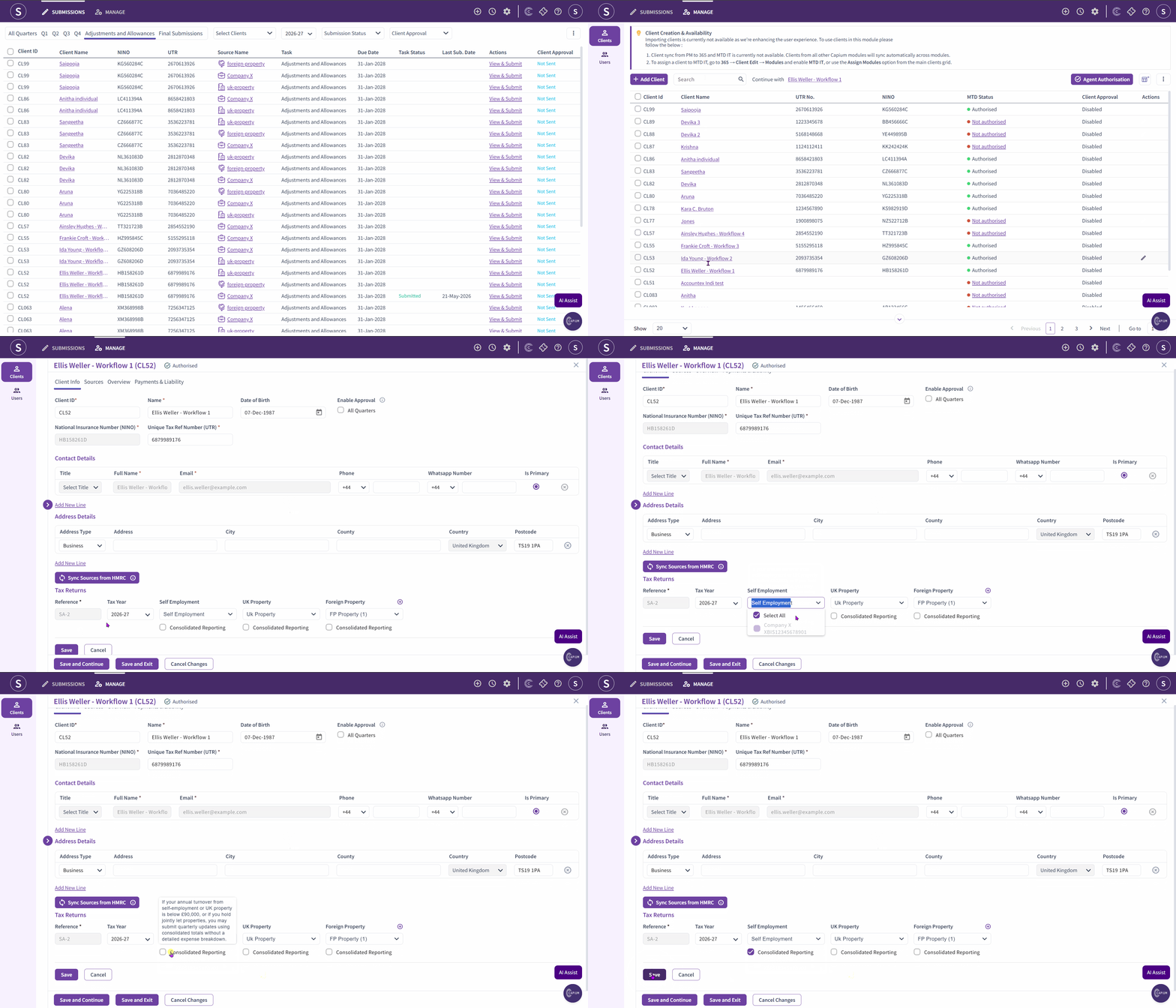
Navigation > MTD IT > Select a client > Quarterly Updates > Submission Settings
Where a client falls below the £90,000 threshold, the consolidated option can be selected and Capium will present the three-line summary format for each quarter.
Where a client exceeds the £90,000 threshold, the detailed template applies and Capium will display the appropriate expense categories based on the income source type (sole trader, UK property, or foreign property).
| Note: This selection should be reviewed at the start of each tax year. If a client's circumstances change from one year to the next, the submission type may need to be updated accordingly. |
Summary
| Consolidated Submission | Detailed Submission | |
|---|---|---|
| Applies when | Annual turnover below £90,000 | Annual turnover above £90,000 |
| What is reported | Total income, total expenses, net profit | Full categorical breakdown of income and expenses |
| Digital records required | Yes | Yes |
| Expense categories submitted | No | Yes |
| Decision timing | Start of tax year | Start of tax year |