
Once all four quarterly submissions have been made to HMRC for the tax year, the next step is to complete the Adjustments and Allowances submission for each income stream. This is the point at which year-end accounting and tax adjustments are applied before the Final Declaration is filed with HMRC.
In Capium's MTD IT module, this process is referred to as Adjustments and Allowances. It corresponds to the year-end adjustment stage that feeds directly into the Final Declaration, which replaces the traditional Self Assessment return under MTD IT.
Note: Following the 2023 Autumn Statement, HMRC permanently removed the End of Period Statement (EOPS) from the MTD IT process. There is no longer a separate EOPS submission. All year-end adjustments, capital allowance claims, and income confirmations are now made through the Adjustments and Allowances stage and submitted as part of the single Final Declaration. If you have seen references to an EOPS in older guidance, these reflect a previous version of the MTD IT design and no longer apply. |
Applies to All Workflows
The Adjustments and Allowances process is the same regardless of which workflow was used for quarterly submissions throughout the year. Whether your client's digital records were maintained using:
- Workflow 1: Bridging
- Workflow 2: Capium 365
- Workflow 3: Capium 365 with Bookkeeping
- Workflow 4: Bookkeeping
The Adjustments and Allowances steps are identical. The quarterly workflow used does not affect what is required here.
One Submission Per Income Stream
An Adjustments and Allowances submission must be made for each source of income separately. For example:
- A client with sole trader income only requires one submission.
- A client with sole trader income and UK property income requires two submissions.
- A client with sole trader income, UK property income, and foreign property income requires three submissions.
Deadline
Adjustments and Allowances are due by 31 January, in line with the Final Declaration deadline. For the 2026-27 tax year, the deadline is 31 January 2028.
Important: Adjustments and Allowances can only be submitted once per income stream per tax year. There is no facility to amend or re-submit once a submission has been filed with HMRC. Please ensure all figures are accurate and reviewed before submitting. |
Prerequisite: Quarterly Submissions
The Adjustments and Allowances screen will only become accessible once all four quarterly submissions (Q1 to Q4) for the relevant client have been made to HMRC. If any quarterly submission is outstanding, the Adjustments and Allowances option will not be available for that client.
Accessing Adjustments and Allowances
Navigation: MTD IT > Submissions > Adjustment and Allowance
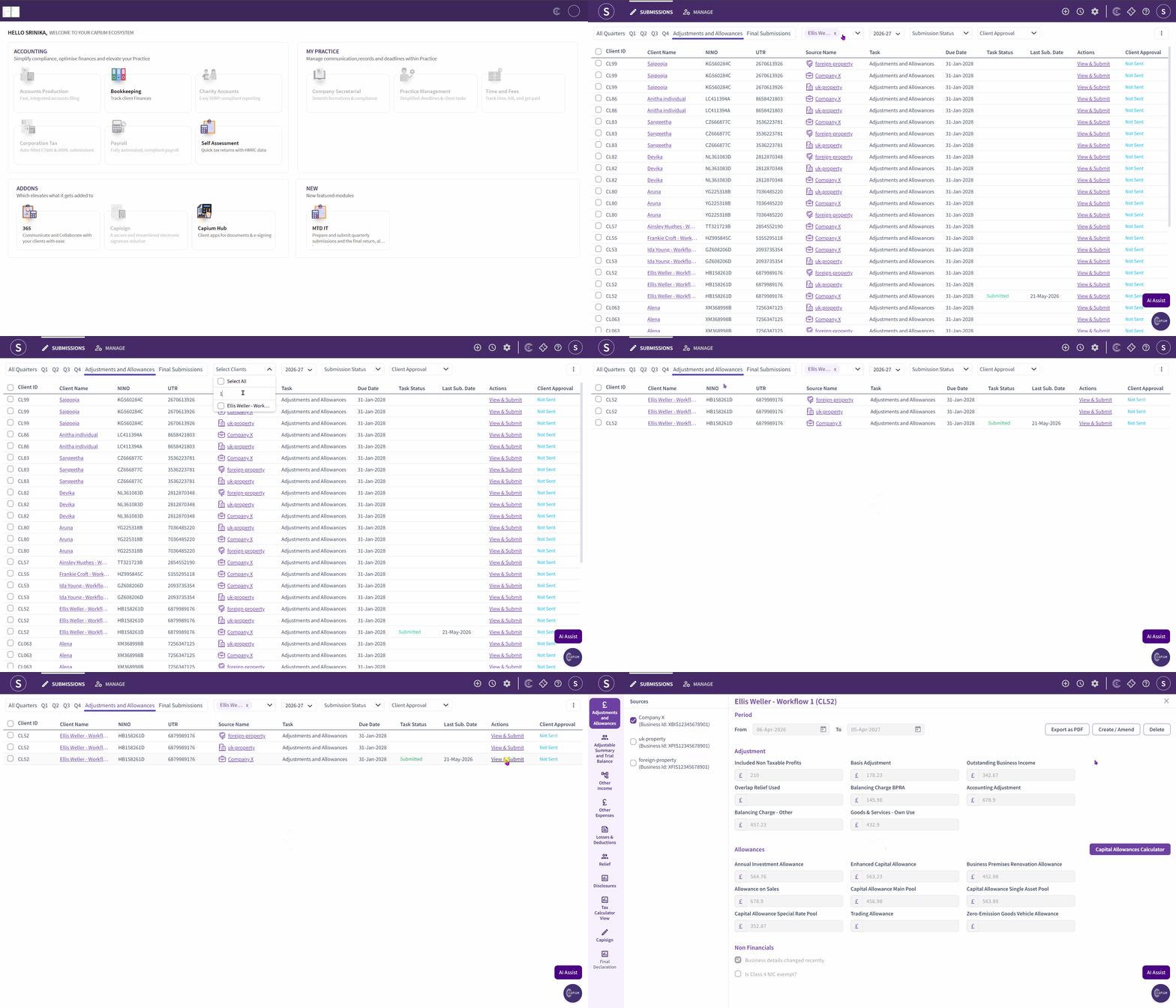
- Navigate to the MTD IT module.
- Select Submissions from the left-hand navigation.
- Click Adjustment and Allowance. This opens the Adjustment and Allowance grid, which lists all clients eligible for year-end submission.
- Use the Select Client section to search or filter for the client you are working on.
- Once the correct client is located, click View and Submit under the Action column on the right-hand side.
This opens the client's Adjustments and Allowances screen. The Sources section on the left displays each income stream linked to the client. Each source has its own set of adjustments and allowances fields.
Sole Trader: Adjustments and Allowances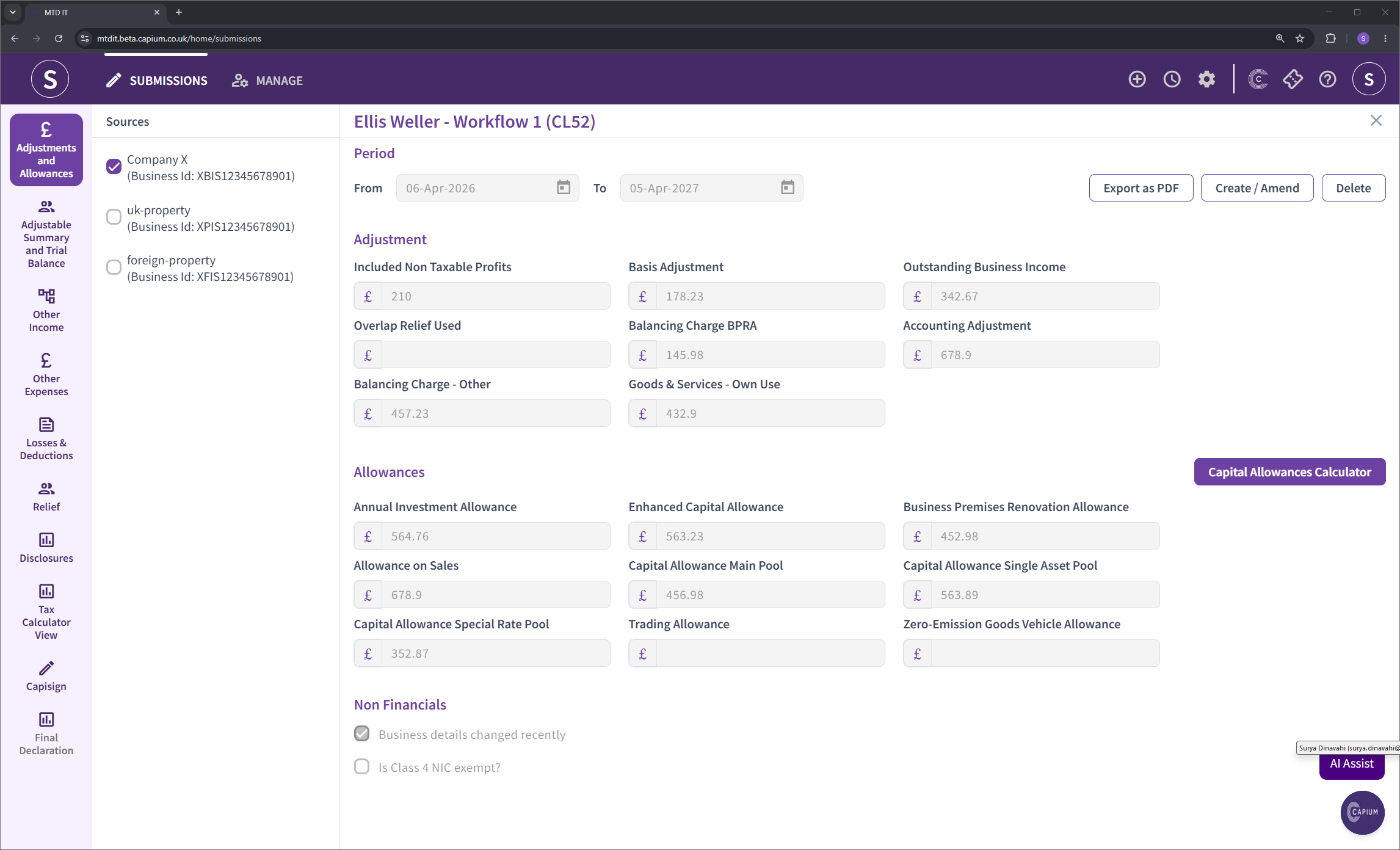
Adjustments
The following adjustment fields are available for sole trader income:
- Non-taxable profit included in figures
- Basis period adjustments
- Outstanding business income not declared in quarterly submissions
- Overlap relief used
- Balancing charge
- Accounting adjustments
- Other balancing charge
- Goods and services for own use
- Zero emission goods vehicle allowance
Allowances
The following allowance fields are available for sole trader income:
- Annual Investment Allowance
- Enhanced Capital Allowance
- Business Premises Renovation Allowance
- Allowance on sales
- Capital Allowance: Main Pool
- Capital Allowance: Single Asset Pool
- Capital Allowance: Special Rate Pool
- Trading Allowance
Capital Allowance Calculator
A built-in Capital Allowance Calculator is available within the sole trader Adjustments and Allowances screen. To use it:
- Click Capital Allowance Calculator within the sole trader section.
- Select Add New Asset to add each asset requiring a capital allowance calculation.
- Enter the relevant details for each asset, including the acquisition date, written-down value, and Annual Investment Allowance eligibility. The calculator will perform the calculations automatically.
The calculator supports a range of asset types including long-life assets. Once assets have been entered and calculated, the resulting figures will populate the relevant allowance fields.
UK Property: Adjustments and Allowances
Adjustments
The following adjustment fields are available for UK property income:
- Private use adjustment
- Balancing charge
- Balancing charge: Business Premises Renovation Allowance (BPRA)
- Period of grace adjustments
Allowances
The following allowance fields are available for UK property income:
- Annual Investment Allowance
- Business Premises Renovation Allowance
- Other Capital Allowance
- Main Pool
- Property Allowance
- Zero Emission Goods Vehicle Allowance
- Cost of Replacing Domestic Items Allowance
Foreign Property: Adjustments and Allowances
Coming Soon: This section is in development. Foreign property Adjustments and Allowances fields will be documented here once the functionality has been released. Please contact Capium Support if you require assistance with foreign property submissions in the interim. |
Compliance Context: Final Declaration
Under MTD IT, the Adjustments and Allowances submission feeds directly into the Final Declaration. The Final Declaration is the single year-end filing that replaces the Self Assessment SA100 return for clients within MTD IT.
The Final Declaration brings together all income sources, including employment income, dividends, savings interest, and any other income not captured in quarterly submissions, alongside the adjustments and allowance claims made here. The resulting tax liability is then calculated by HMRC.
Coming Soon: The Final Submission section is in development. Please contact Capium Support if you require assistance with final submissions in the interim. |
Key points for agents to be aware of:
- The Final Declaration deadline is 31 January following the end of the tax year. For 2026-27, this is 31 January 2028.
- Payment deadlines remain unchanged. The balancing payment and first payment on account are both due on 31 January. A second payment on account is due on 31 July.
- Clients with multiple income streams require a separate Adjustments and Allowances submission per source. There is one Final Declaration which brings all sources together.
- HMRC operates a points-based penalty system for late submissions under MTD IT. Each missed submission (quarterly update or Final Declaration) accrues one penalty point. A financial penalty of £200 is charged once the threshold of four points is reached.
- The penalty easement for late quarterly updates during the 2026-27 tax year does not extend to the Final Declaration. The 31 January 2028 deadline for the 2026-27 Final Declaration will be enforced.