
Once your CIC accounts and CIC 34 report have been prepared, you can generate a submission zip package ready for filing with Companies House.
Navigation: Accounts Production > Select client > Tasks > CIC Submission Wizard
Before you start
Make sure the following have been completed:
- Your CIC accounts have been prepared and finalised.
- Your CIC 34 report has been generated.
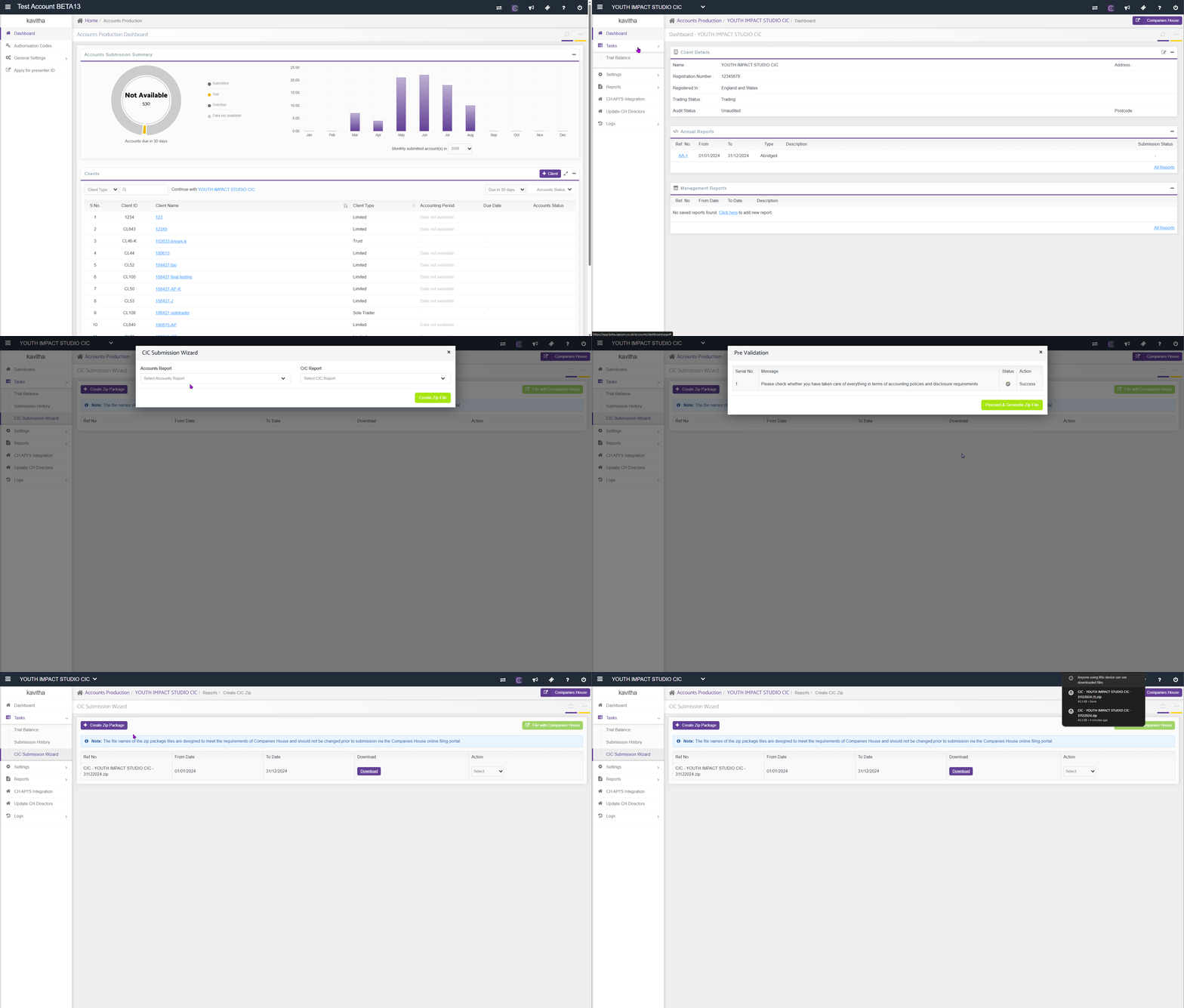
Steps
- From the CIC Submission Wizard, click Create Zip Package.
- Choose your accounts.
- Choose your CIC report.
- Click Generate Report.
The system will run pre-validation checks on your documents. If any check fails, you will not be able to create the zip package until the issue has been resolved.
- Once pre-validation passes, click Proceed and Generate Zip File.
The system will generate a downloadable file. This file must be submitted to Companies House manually via the Government Gateway, as there is currently no in-app submission route for CIC filings.
Related articles: