
Capium 365 is the right option for landlords who own several properties, each with a different ownership split. Rather than applying one flat percentage across a whole portfolio, Capium 365 lets you set an ownership percentage for each property individually, so every property's split is calculated correctly.
This article explains how to add each property with its own ownership percentage, how Capium 365 calculates the client's share, and when the MTD IT Bridging method may be more suitable.
Before you start
• The landlord must be added and activated in Capium 365 at the individual level, not as a sole trader, because the Sources tab that holds property splits sits under the individual client record.
Navigation > Capium 365 > Select client (Individual)
• Link the sole trader to an Individual: If the client is currently set up as a Sole Trader, link them to an Individual and enable MTD IT access for the Individual.
• Have the property information ready: You will need the property's identifying details, including the commencement date.
Step 1: Add the Property Source
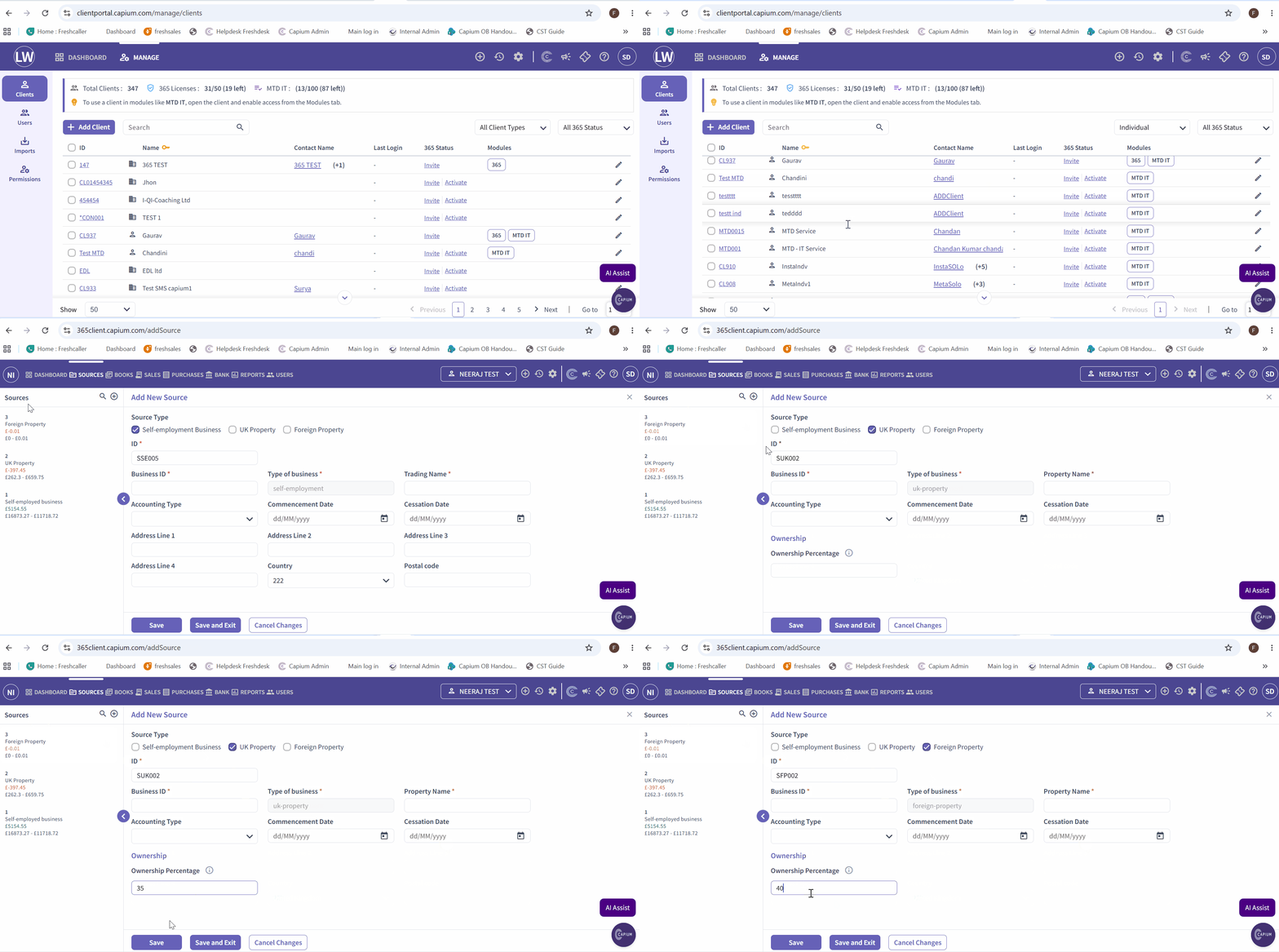
Navigation: Capium 365 > Select Individual Client > Sources > + Add Source > UK Property
1. Select UK Property as the source type.
2. Enter the property's identifying details, including the property ID, address and commencement date.
3. Enter the Ownership Percentage that applies to this property.
4. Save the source.
Repeat these steps for each property the client owns, setting the ownership percentage that applies to that individual property. E.g Property A may have an ownership percentage of 60%, Property B 50%, and Property C 30%.
Please see the picture below for reference:
Step 2: Record Income and Expenses
Once the property source has been added, record the property's income and expenses against the relevant property source.
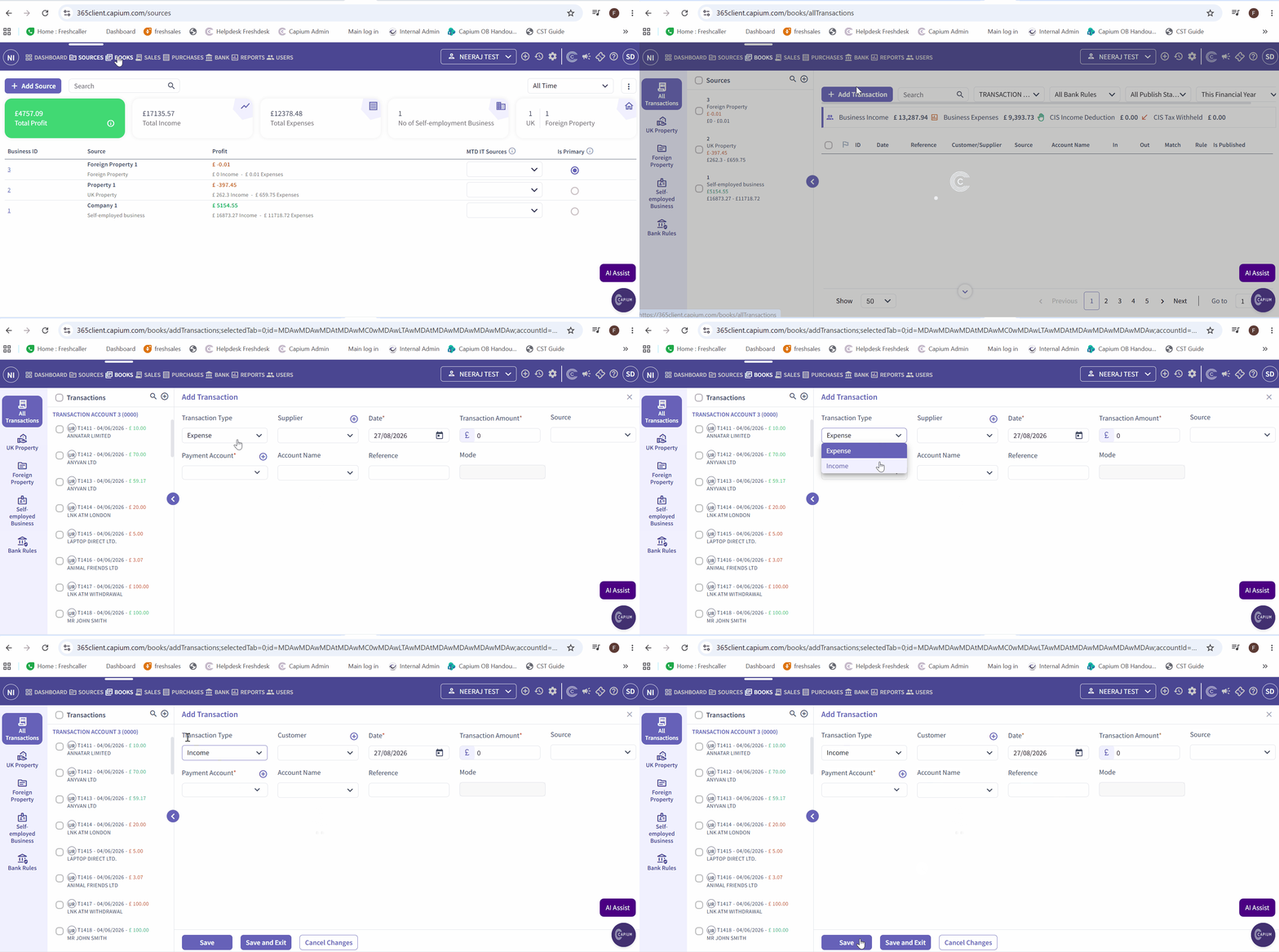
Navigation: Capium 365 > Select Individual Client > Books > Add Transaction
- Navigate to Books
- Select Add Transaction.
- Select the relevant Transaction Type, whether Income or Expense.
- Enter the required transaction details.
- Save the transaction.
Important: Enter the full, gross figures for the property. You do not need to calculate the client's share manually. Capium 365 automatically applies the ownership percentage set for that property, so only the client's correct share of income and expenses feeds into their MTD IT figures. For example, if the property has £10,000 of gross income and the ownership percentage is 60%, Capium 365 will calculate the client's share as £6,000. |
Please see the picture below as reference :
When Capium 365 is not required
If a client's splits are simple and consistent across all their properties, for example every property is owned 50/50 with the same person, the ownership percentage field within MTD IT Bridging may be a simpler option that avoids purchasing Capium 365.
See : MTD IT: Setting Ownership Percentages for Property Splits in Bridging for the step by step guidance
Digital records still apply
Recording transactions in Capium 365 satisfies the digital record-keeping requirement for MTD IT, but the records must still be complete and accurate. HMRC can charge a penalty of up to £3,000 for a failure to keep digital records, or for breaking a digital link, for any given quarterly period. See MTD IT: Understanding Digital Records for the full requirements and penalty position.
Next steps
Once the property sources and ownership percentages have been set and the relevant transactions have been recorded, continue with MTD IT: 365 Workflow (Workflow 2) to complete the remaining steps.
Related articles
• MTD IT: Handling Multiple Properties and Ownership Splits
• MTD IT: Setting Ownership Percentages for Property Splits in Bridging
• MTD IT: Understanding Digital Records
• MTD IT: 365 Workflow (Workflow 2)