
18/08/2026 Update:
HMRC has provided to us a troubleshooting document, which is attached to this support and has created this article. HMRC are very confident the error can be resolved by following precisely the document. This is not a software error.
Client / Agent Not Authorised Error
If you receive a Client / Agent Not Authorised error when trying to access Making Tax Digital (MTD) services, this normally means that HMRC cannot confirm that the customer or agent is authorised to access the requested service.
The most common cause is using Government Gateway credentials that do not have the relevant MTD enrolment attached.
This guide explains the checks to complete before referring the issue to the Live Services team.
Why does the error occur?
A Client / Agent Not Authorised error can occur for several reasons:
The customer or agent is using different Government Gateway credentials from those used to enrol for MTD.
The agent is acting as a supporting agent and is attempting to use an API that is not available to supporting agents.
The customer has not successfully signed up for MTD.
The customer or agent signed into their software before completing their MTD enrolment.
An incorrect National Insurance Number (NINO) suffix has been entered in the MTD software.
1. Check the agent-client relationship
Confirm that the existing agent-client relationship has been successfully transferred from Self Assessment to the Agent Services Account (ASA).
If the existing authorisation has not been added to the ASA, this should be completed before continuing with the remaining checks.
Adding an existing Self Assessment authorisation
From the Agent Services Account homepage:
Select Add existing Self Assessment authorisations to this account.
Select Add an agent code.
Enter the Self Assessment agent code you want to add.
Select Continue.
When prompted, continue to Government Gateway.
Sign in using the Government Gateway credentials associated with that agent code.
Once successful, the existing client authorisations will be added to the Agent Services Account.
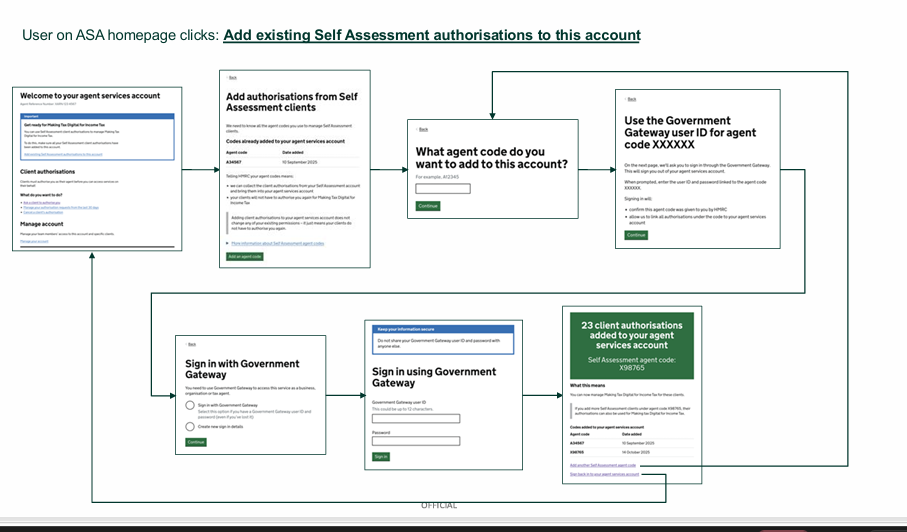
The diagram on page 9 shows the complete journey from the ASA homepage through entering the agent code, authenticating through Government Gateway and confirming that the client authorisations have been added.
2. Check the Government Gateway credentials
Make sure the customer or agent is signing in using the Government Gateway user ID that has the relevant MTD enrolment attached.
For example, if MTD was set up using one Government Gateway account but different credentials were subsequently entered into the software, HMRC may return a 403 error.
Using credentials that do not contain the correct enrolment will result in a 403 not authorised response.
For agents, the login can also be tested using the appropriate HMRC account:
HMRC Online Services for Agents account – for classic Self Assessment.
Agent Services Account – for services managed through the ASA.
3. Check whether the agent is a main or supporting agent
Confirm whether the agent is acting as the main agent or a supporting agent.
Supporting agents have restricted access and can only use specific APIs. If a supporting agent attempts to access an API that is not available to them, HMRC will return a 403 not authorised error.
If the credentials are correct but the error remains, check whether the API being accessed is available to supporting agents.
4. Confirm the customer has signed up for MTD
Verify that the customer has successfully completed their Making Tax Digital (MTD) sign-up.
If the MTD sign-up has not been completed, HMRC will deny access to the MTD service.
5. Sign out and reconnect the software
Check whether the customer or agent connected their software before completing the MTD sign-up.
If they did:
Sign out or disconnect from the software.
Confirm that the MTD enrolment has been completed.
Sign back into the software.
Re-authorise the HMRC connection if prompted.
This allows the software to authenticate again after the MTD enrolment has become available.
6. Check the National Insurance Number
If the MTD service requires a National Insurance Number, confirm that the correct NINO suffix has been entered into the software.
An incorrect suffix can prevent HMRC from successfully authorising the request.
Check the Agent Reference Number
It is also important to make sure the correct type of agent reference is being used.
Agent Services Account
The Agent Services enrolment uses an Agent Reference Number (ARN) in a format similar to:
XARN0123467
Legacy Self Assessment account
Self Assessment enrolments on legacy accounts are shown in the format:
IR-SA-AGENT
An IR agent code is six characters and consists of letters and numbers.
Before referring the issue
Before escalating Client / Agent Not Authorised error to HMRC confirm that:
The agent-client relationship has been transferred to the Agent Services Account where required.
The correct Government Gateway credentials are being used.
The credentials contain the relevant MTD enrolment.
The customer has successfully completed MTD sign-up.
The agent's role has been checked to determine whether they are a main or supporting agent.
The API being accessed is available to the agent's role.
The customer or agent has signed out and back into the software after completing MTD enrolment.
The NINO and suffix have been entered correctly.
The correct agent reference/code is being used.
If all of these checks have been completed and the Client / Agent Not Authorised error continues, please reach out to HMRC. https://www.gov.uk/find-hmrc-contacts/agent-dedicated-line-self-assessment-or-paye-for-individuals