
This guide explains which Bookkeeping chart of account (COA) codes are mapped to each MTD IT category. Use it when reconciling in the Bookkeeping module so that your figures pull through correctly into your MTD IT digital records, quarterly updates and Final Declaration.
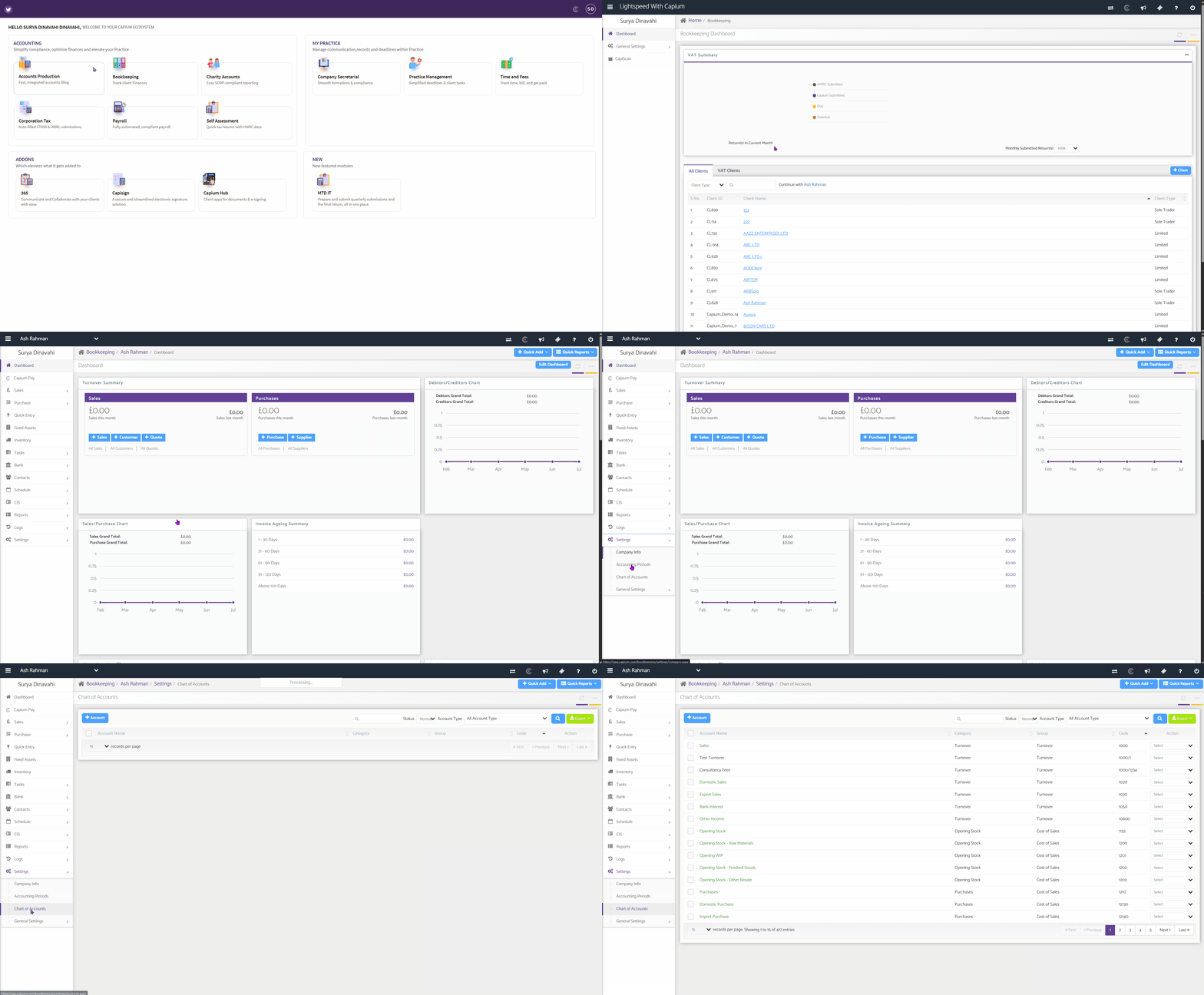
Navigation: Bookkeeping > Select a client > Chart of Accounts
Why this matters
When you use the Bookkeeping module as your record source for MTD IT (Workflow 3 and Workflow 4), every transaction you post is assigned to a chart of account code.
Each code in the lists below is linked to a specific MTD IT category. When you map and import the business into the MTD IT module, transactions are grouped into the matching category on your digital records and summary screens.
If a transaction is posted to a code that is not in these lists, it will not be recognised by the MTD IT mapping and the figure will not pull through.
| Important Note: If you have created any custom (user-added) chart of account codes in Bookkeeping, please be aware that these will not sync with the MTD IT module. |
Allowable and disallowable codes
Some categories have both an allowable and a disallowable version of the same expense. Allowable expenses are costs you can claim tax relief on.
Disallowable expenses are costs you cannot claim tax relief on, such as client entertainment or certain legal fees. Both are recorded in your digital records and both feed the relevant MTD IT category.
Where you submit detailed (full) expenses, the disallowable amount is reported separately to HMRC. Where you are eligible to submit consolidated expenses (turnover under £90,000), you report total income and total expenses without the category breakdown. See MTD IT – Consolidated vs Detailed Submission for more detail.
Income codes
| MTD IT Category | Bookkeeping COA codes |
|---|---|
| Turnover | 1000, 1010, 1020, 1030, 1040, 1041, 1050, 10600 |
| Others (income) | 1520, 2000, 2010, 2020, 2030, 2031, 2032, 2033, 2034, 2035, 2036, 2134 |
Expense codes
| MTD IT Category | Allowable codes | Disallowable codes |
|---|---|---|
| Cost of Goods Bought | 1122, 1200, 1201, 1202, 1203, 1210, 1211, 1212, 1220, 1221, 1222, 1223, 1272, 1274, 1378, 1510, 6667, 12130, 12140 | None |
| CIS Payment to Sub-contractors | 1270 | 12930 |
| Staff Cost | 1230, 1231, 1232, 1233, 1400, 1401, 1402, 1403, 1404, 1405, 1406, 1407, 1410, 1411, 1412, 1413, 14080 | 14094 |
| Travelling Cost | 1271, 1460, 1461, 1462, 1463, 1464 | 14642 |
| Premises Running Cost | 1273, 1440, 1441, 1442, 1443, 1446, 1447, 1457, 1585, 1586, 1587 | 14571 |
| Maintenance | 1444, 1575 | 1445 |
| Admin Cost | 1576, 1577 | 15824 |
| Advertising Cost | 1379, 1571 | 13846 |
| Entertainment Cost | 1382, 1572 | 1388, 1582 |
| Professional Fees | 1431, 1432, 14340 | 1433, 14333 |
| Interest | 2500, 2501, 2502, 2503, 2504, 2505, 2506, 2507, 2508, 2509, 2510, 2511, 2800, 2820 | 2527 |
| Financial | 1517, 15170 | 15190 |
| Bad Debt | 1511, 1512 | 15191 |
| Depreciation | 1240, 1241, 1242, 1243, 1244, 1245, 1246, 1250, 1260, 1540, 1541, 1542, 1543, 1544, 1545, 1546, 1547, 1548, 1549, 1550, 1551, 1552, 1560, 1561, 2220, 2221, 2222, 8300, 8301, 8302, 8303, 8304, 8508, 8510, 8511 | None |
| Others (expenses) | 1370, 1371, 1391, 1520, 1573, 1574, 1578, 1579, 1580, 2010 | 1581, 13847, 15825 |
Disallowable codes at a glance
For reference, the disallowable codes above are:
| Account name | Code |
| CIS Payment to Sub-contractors (Disallowable) | 12930 |
| Staff Costs (Disallowable) | 14094 |
| Travelling Costs (Disallowable) | 14642 |
| Premises Running Cost (Disallowable) | 14571 |
| Property Maintenance (Disallowable) | 1445 |
| Admin Cost (Disallowable) | 15824 |
| Advertising Costs (Disallowable) | 13846 |
| Entertainment (Disallowable) | 1388, 1582 |
| Legal and Professional Fees (Disallowable) | 1433 |
| Professional Fees (Disallowable) | 14333 |
| Interest Payable and Similar Charges (Disallowable) | 2527 |
| Financial Costs (Disallowable) | 15190 |
| Bad Debts (Disallowable) | 15191 |
| Donations (Disallowable) | 1581 |
| Other Expenses (Disallowable) | 13847, 15825 |
How to use this list when reconciling
- In the Bookkeeping module, open the client and work through your transactions as usual.
- Post each transaction to one of the standard codes listed above, rather than a custom code (see the note on custom codes above).
- Where a category has both an allowable and a disallowable version, choose the one that reflects how the cost is treated for tax. If you are unsure whether a cost is allowable, check the current HMRC guidance or with your accounting body.
- Once your transactions are posted and reconciled, map and import the business into the MTD IT module. Figures are grouped into their MTD IT categories automatically, based on the codes you have used.
- On the summary screen, review the cumulative income and expense totals for the quarter and confirm they are complete and correct before you send your quarterly update.
For the full mapping and import steps, see the related articles below.
Please see related articles below for more information:
MTD IT – Bookkeeping Workflow (Workflow 4)
MTD IT – Capium 365 and Bookkeeping Workflow (Workflow 3)
MTD IT – How to make Quarterly Submissions