
The P11 Deductions Sheet is a statutory payroll report that provides a month-by-month breakdown of each employee's tax, National Insurance (NI) contributions, statutory payments, and student loan deductions across the full tax year. In Capium Payroll, this report can be accessed at any point during the tax year and exported to Excel for filing, review, or client distribution purposes.
| Note: The P11 Deductions Sheet is generated on a per-employee basis. You will need to run a separate report for each employee where required. |
Navigating to the P11 Deductions Sheet
Navigation > Payroll > Select a client > Reports > P11 Deductions Sheet
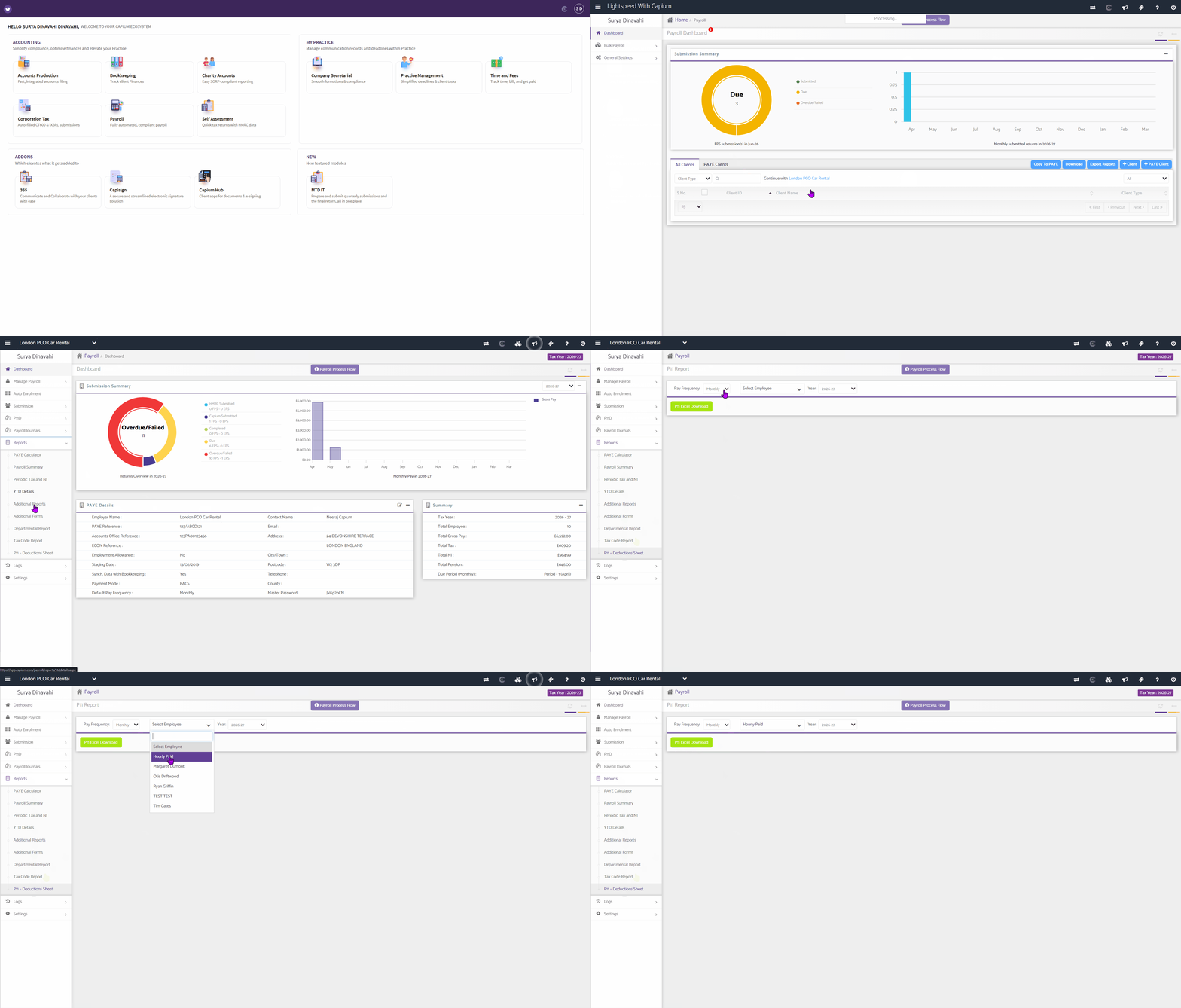
Log in to Capium and select the relevant client from your client list.
From the left-hand navigation panel, select Reports.
In the expanded Reports menu, select P11 Deductions Sheet.
Filtering the Report
Once on the P11 Report screen, use the filter options at the top of the page to configure the report before downloading.
- Under Pay Frequency, select the applicable frequency from the dropdown (for example, Weekly, Two Weekly, Four Weekly, and Monthly).
- Under the employee dropdown, select the employee whose P11 you wish to view.
- Under Year, confirm or select the relevant tax year from the dropdown (for example, 2026-27).
Note: The tax year displayed in the top-right corner of the screen reflects the active tax year for the selected client. Ensure this matches the year you are reporting on before downloading. |
Downloading the P11 Report
Once your filters are set, select the green P11 Excel Download button.
The report will download automatically as an Excel file (.xls) to your default downloads folder.
Open the file to view the full P11 Deductions Sheet, which includes the following sections:
The top of the report displays the employee's personal and payroll information, including surname, first name, National Insurance number (NINO), date of birth, gender, tax code, date of starting, and student loan deductions case reference.
Monthly Breakdown (Main table):
The report presents one row per pay period (Month 1 to Month 12) covering the following fields:
- Pay Frequency and Tax Code
- NI Category
- Earnings at Lower Earnings Limit (LEL), above LEL up to Primary Threshold (PT), above PT up to Upper Accrual Point (UAP), and above UAP up to Upper Earnings Limit (UEL)
- Total employee and employer NI contributions, and employee contributions above PT
- Statutory payments: Statutory Sick Pay (SSP), Statutory Maternity Pay (SMP), Paternity Pay (Birth and Adoption), Statutory Neonatal Care Pay, Statutory Adoption Pay (SAP), and Statutory Parental Bereavement Pay
- Student Loan Deductions (SLD)
- Pay including statutory payments, and total pay to date
- Free pay this period and total free pay to date (W1/M1 codes only)
- Total additional pay to date and total taxable pay to date
- Total tax due to date, tax due at end of the current period (with refunds marked R), regulatory limit, and tax deducted or refunded