
Making Tax Digital for Income Tax (MTD IT) is being introduced in phases by HRMC to ensure a smooth and structured transition for taxpayers and agents.
Important: The rollout will bring individuals into the regime gradually over a three-year period, based on income thresholds and HMRC’s eligibility criteria. As an agent, it is essential to proactively identify which clients fall within scope and register them in time. |
Before you start:
To ensure your clients are correctly set up for Making Tax Digital for Income Tax (MTD IT), there are three key steps you need to complete as part of the Client Authorisation journey.
Following these steps in the correct order will help ensure your clients are identified, registered with HMRC, and successfully authorised in Capium, so you are ready to manage their MTD IT obligations.
1. Identify Affected Clients in Capium (For Existing Customers) 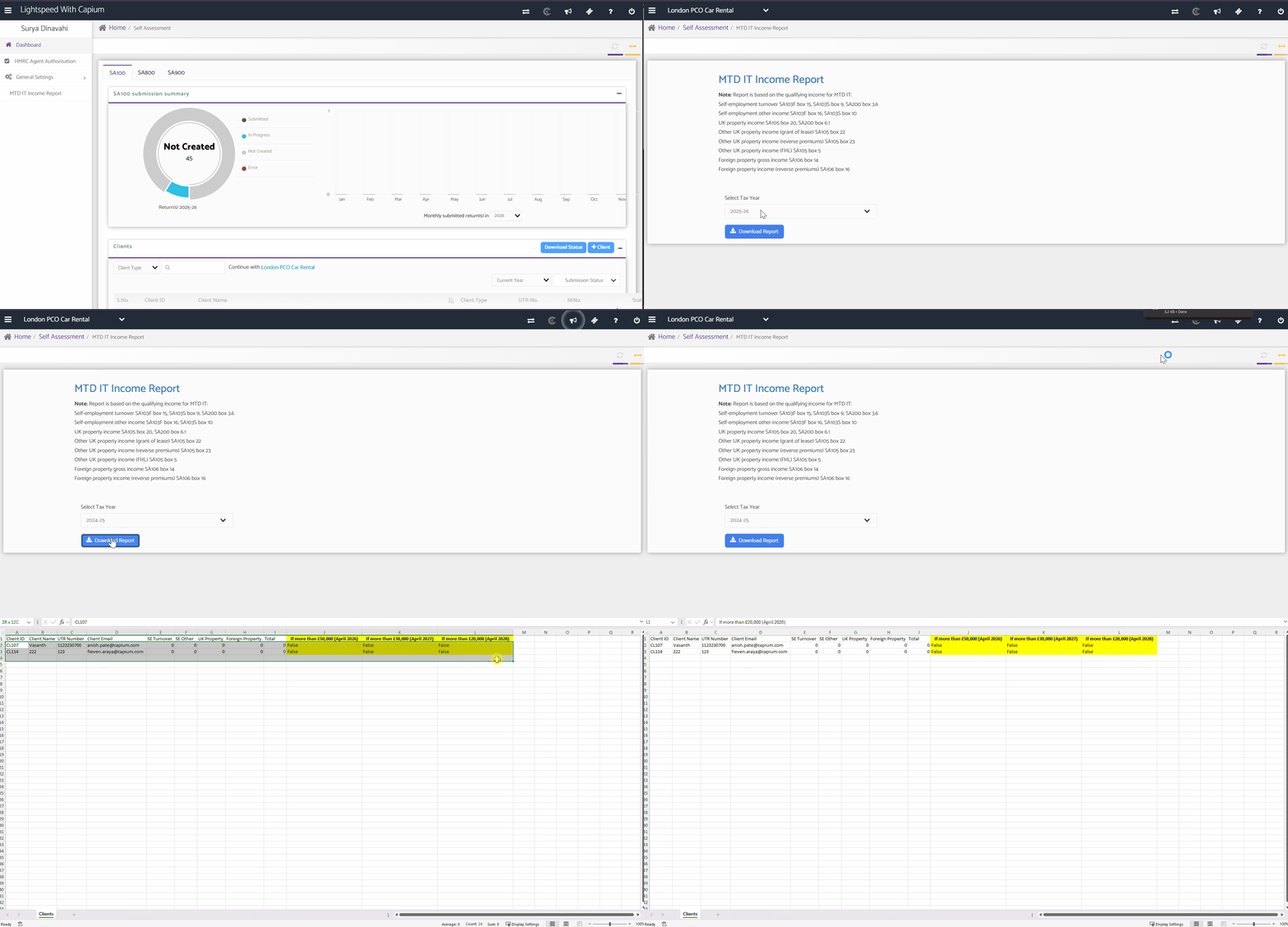
To support you through this transition, Capium has developed a dedicated MTD IT Income Threshold Report within the Self-Assessment module.
How to Access the Report:
- Navigation: Self-Assessment > MTD IT Income Report
- Select the year and click download report
- This will now download an excel file with all your clients
- Review income levels across your entire Self-Assessment client base
The MTD IT Income Report allows you to:
- Review income levels across your entire Self-Assessment client base
- Identify clients likely to fall within MTD IT thresholds
- Plan registrations in advance of mandation dates
For detailed guidance on how to run the MTD IT report, please refer to our dedicated help article.
For information on how to run the MTD IT article for the dedicated article.
2. Verify Eligibility via HMRC Agent Services Account
Once you have compiled your client list in Capium, the next step is to verify each client’s eligibility through your HMRC Agent Services Account (ASA).
If the client meets the qualifying criteria, you can proceed with registering them for Making Tax Digital for Income Tax (MTD IT) at the same time.
Please refer to the link below to access our dedicated help article, which provides step-by-step guidance on how to complete this process within your Agent Services Account.
3. Authorise Capium as Your MTD IT Software
Once the sign-up process with HRMC is complete, your practice will be ready to manage digital record keeping, quarterly updates, and final declarations for MTD IT within Capium.
However, registration alone is not sufficient. After signing the client up for MTD IT via HMRC, you must also authorise Capium to act as your MTD IT software for that client.
This authorisation is completed directly from the client’s MTD IT setup screen within Capium and establishes the secure connection required to submit updates and declarations to HMRC.
Once authorised, you can confidently manage the client’s MTD IT obligations fully within Capium.
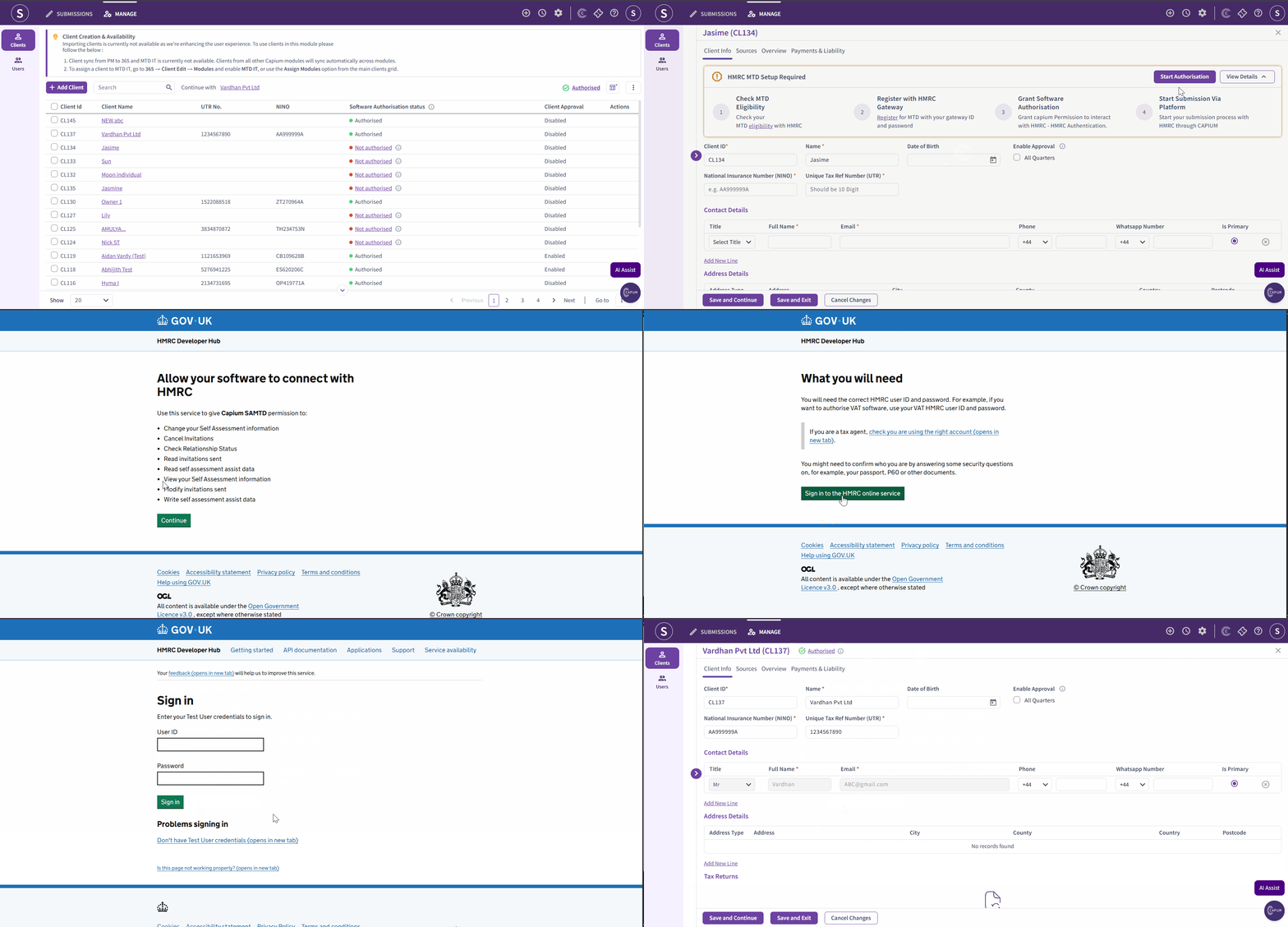
How to Authorise Capium as Your MTD IT Software
- Navigation: MTD IT >Manage > Select Client >Start Authorisation
- Open the Client and Start Authorisation
Search for the relevant client, click Start Authorisation, then select Authorise with HMRC. - Continue to HMRC
Click Continue, then select Sign in to HMRC Online Services. - Sign in to Your Agent Services Account Account
Sign in using your Agent Services Account credentials. - Give Permission
Click Give permission and complete the required HMRC verification. - Complete Authorisation
Once approved, you will be redirected to Capium and the client's MTD IT status should show as Authorised.
Important: If the status does not update immediately, refresh the page or re-open the client record to confirm the authorisation has been successfully applied. |
Please follow the link below to access our dedicated help article explaining how to authorise Capium as your MTD IT software.
Related articles:
MTD IT - Checking and Registering your client with HMRC
MTD IT - How to allow software to connect with HMRC
MTD IT: How to Revoke HMRC Authorisation for a Client
What does “Authorised with HMRC” mean and why do I need it? (MTD IT)
How to Add Client Authorisations to Your Agent Services Account